Reading time: 4 minutes | Difficulty: Intermediate
Overview
Automatically remind customers who started checkout but didn’t complete payment. This guide covers configuring cart abandonment recovery emails.
Prerequisites
- WP Payment Pal installed
- Email settings configured
- Forms collecting customer email
What is Cart Abandonment?
Cart abandonment occurs when a customer:
- Fills out payment form
- Provides their email
- Doesn’t complete payment
- Leaves the page
Abandonment emails remind them to complete the purchase.
Accessing Abandonment Settings
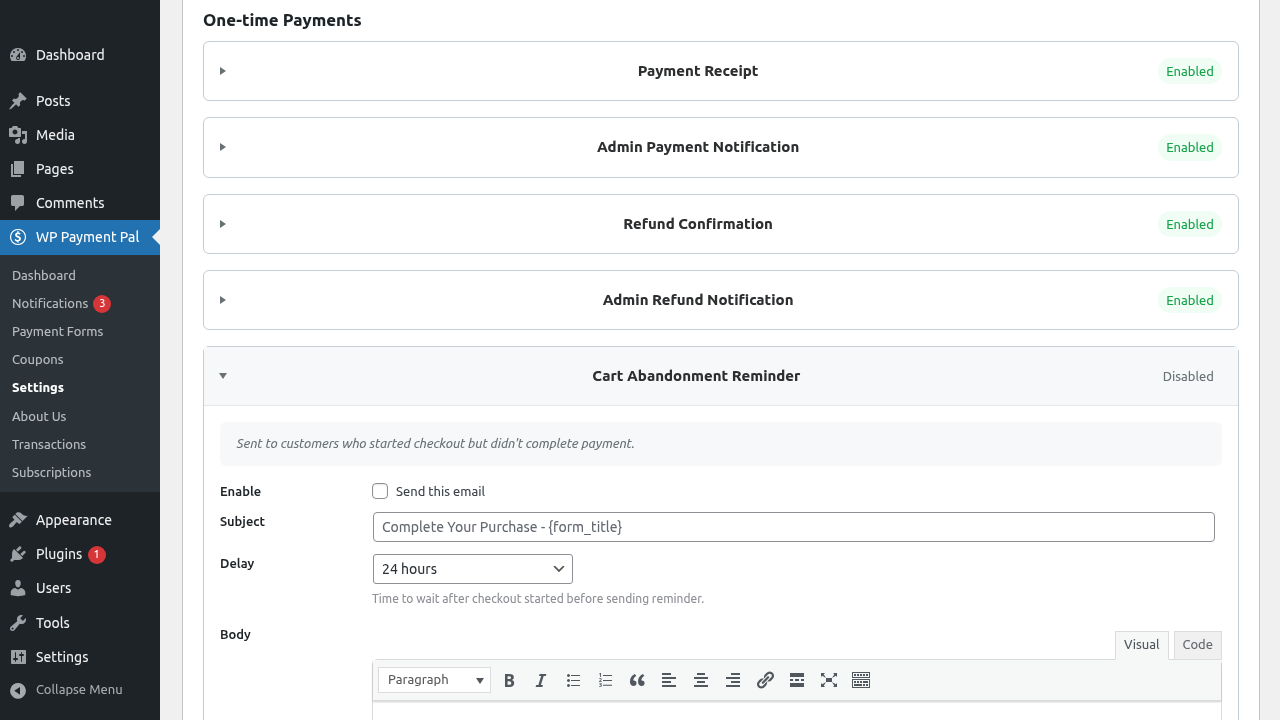
- Go to WP Payment Pal > Settings
- Click the Emails tab
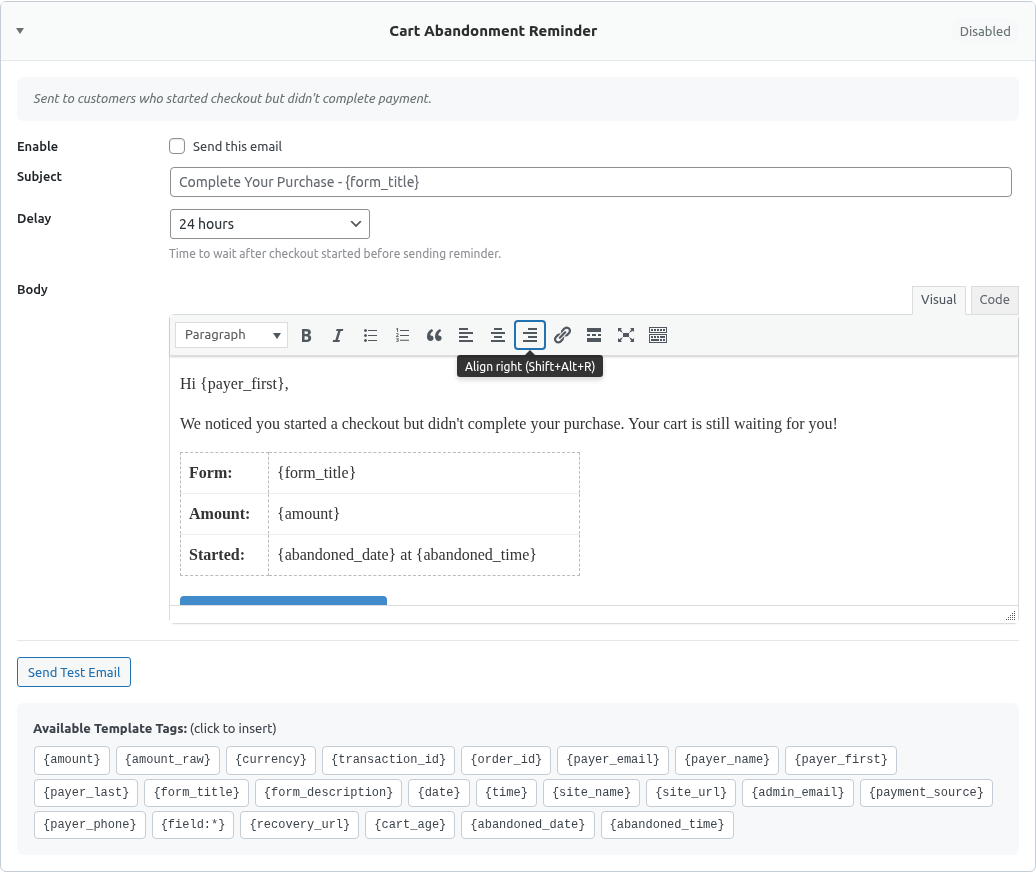
- Find Cart Abandonment Reminder section
Step 1: Enable Cart Abandonment
Toggle Enable Cart Abandonment Emails to On.
Note: This feature is disabled by default.
Step 2: Set the Delay
Choose how long to wait before sending:
| Delay | Use Case |
|---|---|
| 1 hour | Quick reminder, high urgency |
| 2-4 hours | Balanced approach |
| 24 hours | Gentle nudge |
| 48-72 hours | Last chance reminder |
Recommended Approach
- E-commerce: 2-4 hours
- Services: 24 hours
- High-value: 1-2 hours (then follow-up)
Step 3: Configure Email Content
Subject Line
Create compelling subjects:
You left something behind!Complete your order - {form_title}Don't miss out on {form_title}Your cart is waiting, {payer_name}Email Body
Write persuasive content:
Hi {payer_name},

You started checking out but didn't complete your order.

YOUR CART
─────────
{form_title}
Amount: {amount}

Don't worry - your cart is saved!

Complete your purchase now:
{recovery_url}

Questions? Just reply to this email.

Best,
[Company Name]

---
You received this email because you started checkout at [site].
Smart Tags for Abandonment
| Tag | Description |
|---|---|
{recovery_url} |
Link to complete checkout |
{cart_age} |
Time since abandonment (“2 hours ago”) |
{abandoned_date} |
Date checkout started |
{abandoned_time} |
Time checkout started |
{payer_name} |
Customer’s name |
{payer_email} |
Customer’s email |
{amount} |
Cart total |
{form_title} |
Product/form name |
Recovery Link
The {recovery_url} tag:
- Links directly to the form
- Pre-loads their information
- Valid for 7 days
- Secure token-based
Email Templates
Standard Reminder
Subject: Complete your purchase!

Hi {payer_name},

You're almost done! You started checking out {cart_age}
but didn't finish.

Good news - your cart is still saved:

{form_title} - {amount}

Click here to complete your order:
{recovery_url}

If you had any issues during checkout, let us know
and we'll help!

Thanks,
[Company Name]
Urgency Approach
Subject: Your cart expires soon!

Hi {payer_name},

Don't let this slip away!

You were about to get:
{form_title} for just {amount}

Your saved cart will expire soon.

Complete your order now:
{recovery_url}

Questions? We're here to help!

[Company Name]
Helpful Approach
Subject: Need help completing your order?

Hi {payer_name},

We noticed you started checking out but didn't finish.
Sometimes things come up - we get it!

If you had any trouble or questions about:
{form_title} ({amount})

We'd love to help. Just reply to this email.

Or if you're ready, complete your order here:
{recovery_url}

Either way, we're here for you!

Best,
[Company Name]
Incentive Approach
Subject: Here's 10% off to complete your order

Hi {payer_name},

We noticed you left something in your cart.

As a thank you for your interest, here's a special
offer: 10% off if you complete your order today!

{form_title}
Original: {amount}
With discount: Use code COMEBACK10

Complete your order:
{recovery_url}

Offer expires in 24 hours.

[Company Name]
When Emails Are Sent
The system:
- Tracks when forms are started (email captured)
- Waits for payment completion
- If no payment after delay → sends reminder
- If payment completes → no email sent
Email Won’t Be Sent If
- Customer completes payment
- Email address wasn’t captured
- Form doesn’t have email field
- Cart abandonment is disabled
Best Practices
Subject Lines
- Create curiosity
- Mention the product
- Personalize when possible
- Keep under 50 characters
Email Body
- Remind what they’re getting
- Make the link prominent
- Address potential concerns
- Include contact info
Timing
- Don’t wait too long
- Consider your audience
- Test different delays
- Monitor open rates
Recovery Link Expiration
Recovery links:
- Valid for 7 days
- Work only once (after completion)
- Are secure and unique
- Return to the same form
Compliance Considerations
CAN-SPAM / GDPR
- Only email those who started checkout
- Include unsubscribe option if required
- Don’t send excessive emails
- Respect opt-out requests
One Email Policy
WP Payment Pal sends one abandonment email per cart:
- No spam
- Respectful approach
- Effective enough
Tracking Success
Monitor your recovery rates:
- Track links clicked
- Track recovered payments
- Compare different subject lines
- Test timing variations
Troubleshooting
Emails not sending
- Verify feature is enabled
- Check email server working
- Confirm delay has passed
- Ensure email was captured
Recovery link not working
- Check link hasn’t expired (7 days)
- Verify form still exists
- Clear browser cache
- Test with new abandonment
Wrong information in email
- Check Smart Tag spelling
- Verify data was captured
- Test with known values
What’s Next?
- Using Smart Tags in Emails – Dynamic content
- Configuring Email Settings – Email setup
- Configuring Customer Receipt Emails – Post-purchase emails