Reading time: 4 minutes | Difficulty: Beginner
Overview
View complete information about individual payments including customer data, form responses, and PayPal details. This guide covers the transaction detail view.
Prerequisites
- At least one transaction processed
- Access to transaction list
Accessing Transaction Details
- Go to WP Payment Pal > Transactions
- Click on any transaction row
- View the detail page
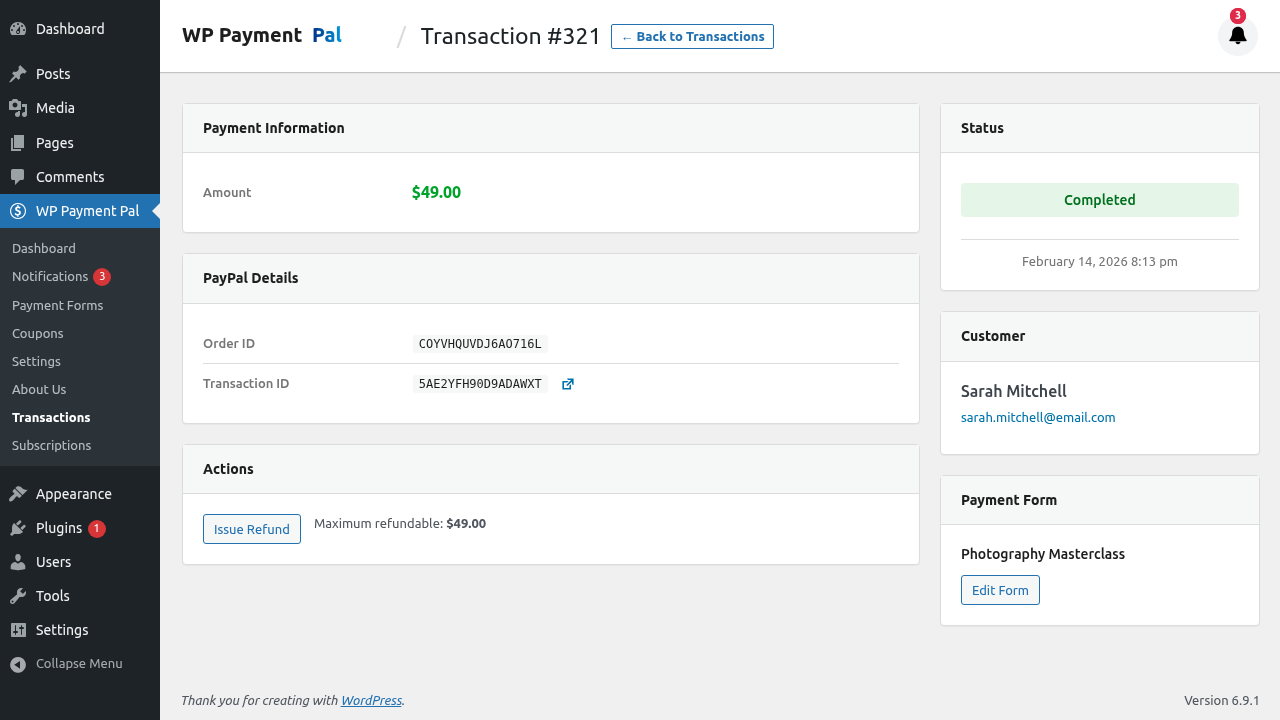
Detail View Sections
Header Information
At the top you’ll see:
- Transaction ID
- Status badge
- Quick action buttons
Customer Information
| Field | Description |
|---|---|
| Name | Customer’s full name |
| Customer’s email address | |
| PayPal Payer ID | PayPal account identifier |
Payment Information
| Field | Description |
|---|---|
| Amount | Payment total |
| Currency | Payment currency |
| Status | Current transaction status |
| Date | Payment timestamp |
| PayPal Transaction ID | PayPal reference number |
| PayPal Capture ID | Capture reference (for refunds) |
Form Information
| Field | Description |
|---|---|
| Form | Which payment form was used |
| Form ID | Internal form identifier |
| Payment Mode | Sandbox or Live |
Form Field Values
All submitted form data:
- Customer name
- Email address
- Phone number
- Custom fields
- Any other collected data
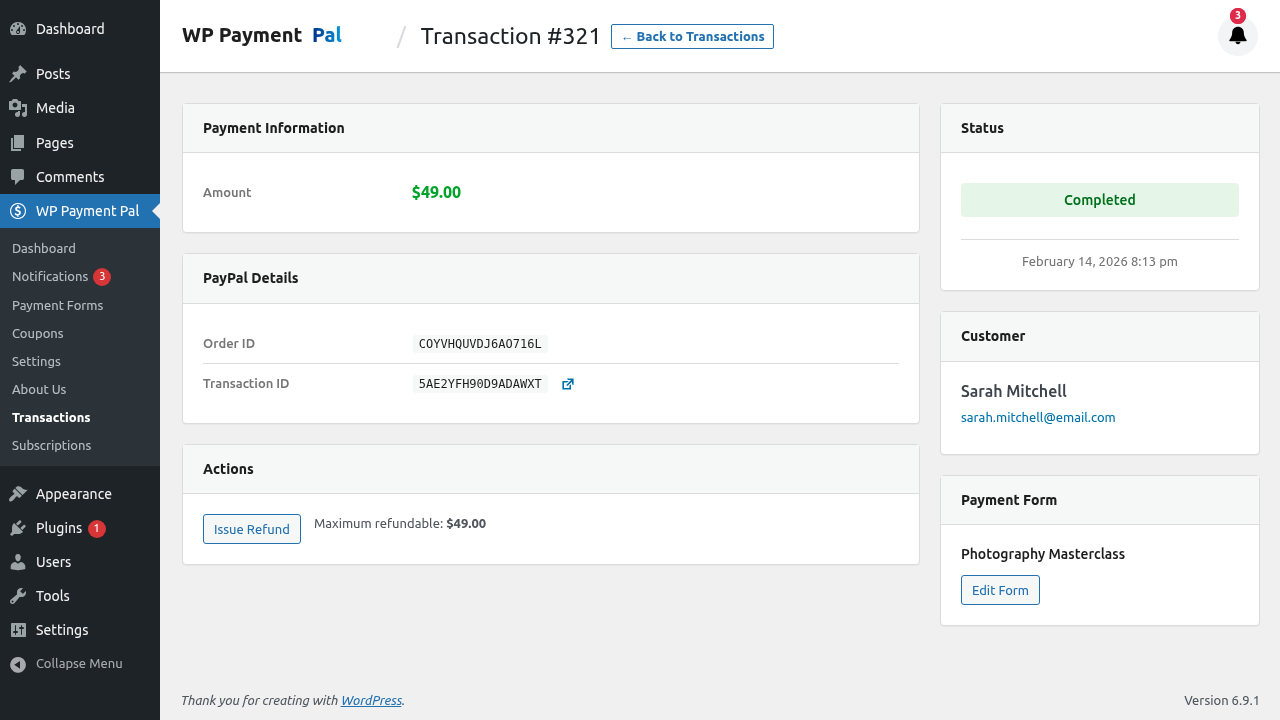
Order Details
For multi-select or quantity orders:
- Line items selected
- Quantities purchased
- Individual item prices
- Subtotals
Coupon Information
If a coupon was used:
- Coupon code
- Discount amount
- Discount type (percentage/fixed)
Subscription Information
For subscription payments:
- Subscription ID
- Billing cycle
- Next billing date
- Subscription status
Transaction Statuses Explained
Completed
✓ Payment successful
✓ Funds captured
✓ Can be refunded
Most payments have this status.
Pending
⏳ Awaiting completion
⏳ May be processing
⏳ Check PayPal for details
Usually resolves to Completed or Denied.
Refunded
↩ Full refund issued
↩ No refundable balance
↩ Original amount shown
Transaction was fully refunded.
Partially Refunded
↩ Partial refund issued
↩ Remaining balance refundable
↩ Shows refund history
Some amount was refunded, remainder available.
Denied
✗ Payment rejected
✗ No funds captured
✗ Cannot be refunded
Payment was declined by PayPal.
Action Buttons
Refund Button
Available for:
- Completed transactions
- Partially refunded (remaining balance)
View in PayPal
Link to view the transaction in your PayPal dashboard for additional details.
Understanding PayPal IDs
Transaction ID
- PayPal’s unique payment identifier
- Format:
XXXXXXXXXXXXXX - Used for PayPal support inquiries
Capture ID
- Reference for captured funds
- Required for processing refunds
- Different from transaction ID
Payer ID
- Customer’s PayPal account ID
- Identifies the paying account
- Not the customer’s email
Refund History
If refunds were issued, you’ll see:
- Refund date
- Refund amount
- Refund ID
- Note to payer (if provided)
Timeline View
Some views show a timeline:
- Payment initiated
- Payment completed
- Refund issued (if applicable)
Common Use Cases
Customer Inquiry
When a customer asks about their payment:
- Search by email
- View transaction details
- Confirm amount and date
- Provide transaction ID
Refund Request
When processing a refund:
- View transaction details
- Verify original amount
- Check refund eligibility
- Process refund
Debugging Issues
When troubleshooting:
- Check all field values
- Verify PayPal IDs
- Review status history
- Check for errors
Printing/Saving Details
To keep a record:
- Use browser print function
- Screenshot the page
- Note key IDs for reference
Linking to PayPal
The transaction can be found in PayPal:
- Copy the PayPal Transaction ID
- Go to PayPal Activity
- Search by ID
- View PayPal’s record
Privacy Considerations
Transaction details contain personal information:
- Limit access to authorized users
- Don’t share screenshots publicly
- Follow data protection regulations
Troubleshooting
Missing information
- Check if webhook delivered all data
- Verify form fields were submitted
- Look in PayPal for additional info
Status seems wrong
- Allow time for webhook processing
- Check PayPal for current status
- Contact support if persistent
Can’t find transaction
- Check date range
- Verify payment mode (Sandbox/Live)
- Search by different criteria
What’s Next?
- Processing Full Refunds – Refund entire amount
- Processing Partial Refunds – Refund specific amount
- Viewing Transaction History – List view