Reading time: 3 minutes | Difficulty: Beginner
Overview
Charge a one-time setup fee when customers start a subscription. This guide covers configuring setup fees and common use cases.
Prerequisites
- A subscription price option configured
- Understanding of your pricing model
What is a Setup Fee?
A setup fee is a one-time charge collected at the start of a subscription:
- Charged immediately at signup
- Separate from recurring billing
- Covers initial costs or provides revenue
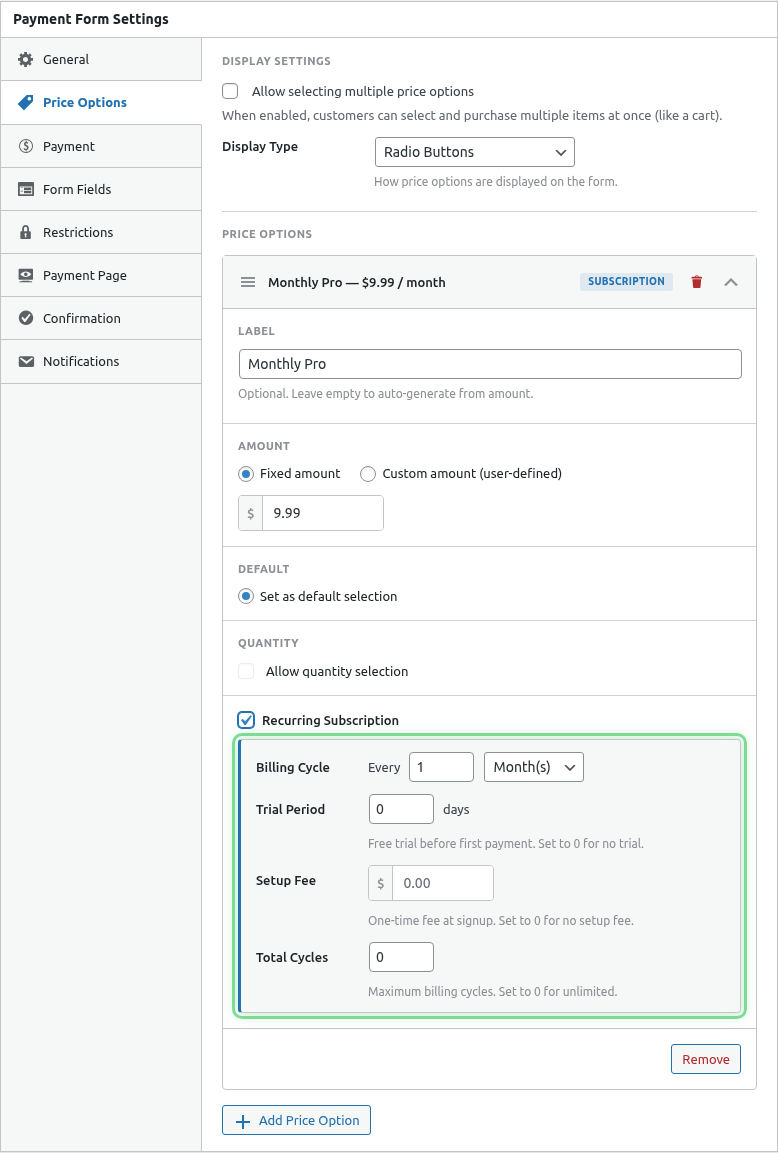
Step 1: Access Subscription Settings
- Edit your payment form
- Click the Price Options tab
- Expand your subscription price option
Step 2: Enable Setup Fee
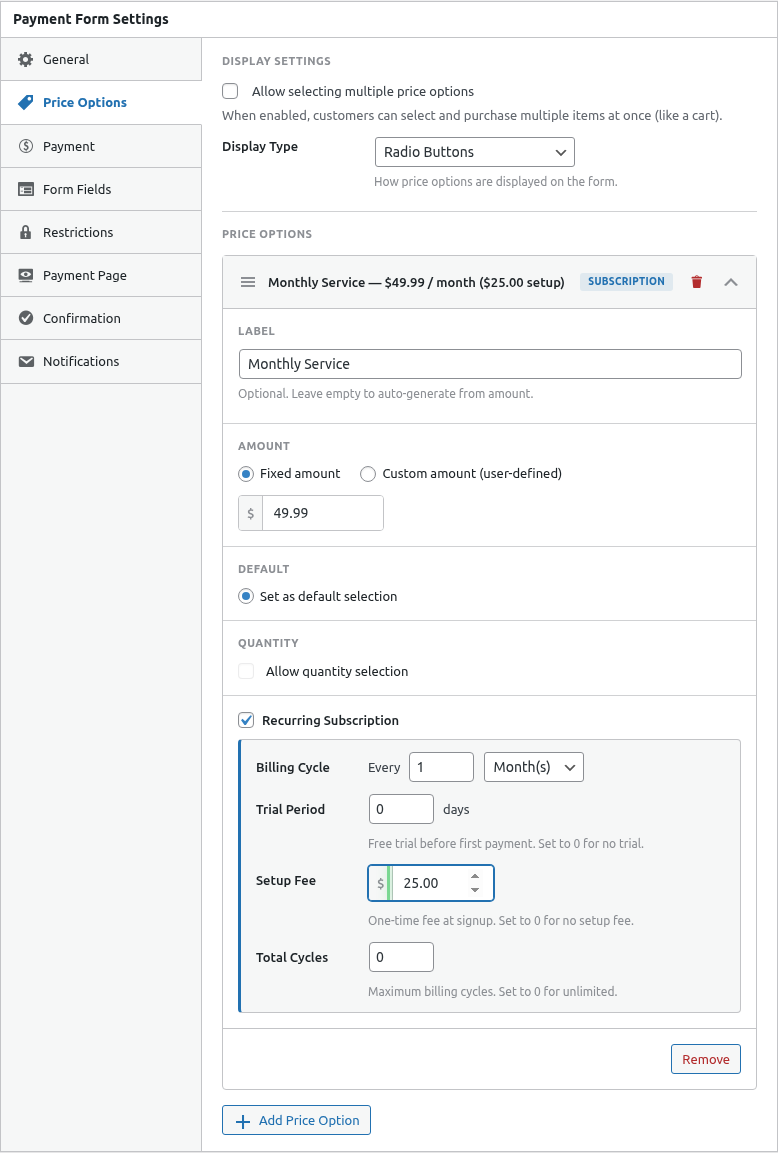
- Find the Setup Fee setting
- Toggle it On
- Enter the fee amount
Payment Timeline
Example: $49 setup + $29/month subscription
| Event | Charge |
|---|---|
| Signup | $49 setup fee |
| Month 1 | $29 recurring |
| Month 2 | $29 recurring |
| Month 3 | $29 recurring |
| … | Continues |
With Trial Period
| Event | Charge |
|---|---|
| Signup | $49 setup fee |
| Trial (14 days) | $0 |
| After trial | $29/month |
The setup fee is charged even during free trials.
Common Use Cases
Software Onboarding
Setup Fee: $99
Monthly: $49

Covers:
- Account configuration
- Data migration
- Training session
Membership Initiation
Setup Fee: $50
Annual: $200

Covers:
- Welcome kit
- Member card
- Initial materials
Service Activation
Setup Fee: $25
Monthly: $15

Covers:
- Account setup
- Integration work
- Initial consultation
Equipment Cost Recovery
Setup Fee: $199
Monthly: $29

Covers:
- Hardware shipped to customer
- Installation support
Displaying Setup Fees
Customers see the setup fee clearly:
- In the price option description
- In the order summary at checkout
- On the PayPal payment page
Frontend Display
The checkout shows:
Pro Plan - $29/month
Setup Fee: $49 (one-time)
─────────────────────────
Due Today: $49
Then $29/month
Setup Fee with Coupon
If coupons are enabled:
- Percentage coupons – Apply to both setup fee and recurring
- Fixed coupons – Apply to the total due today
Configure coupon behavior based on your preference.
Communicating Setup Fees
Be transparent about setup fees:
In Form Description
“A one-time $49 setup fee applies to cover your personalized onboarding.”
In Confirmation Email
Your order summary:
- Setup Fee: $49.00 (charged today)
- Monthly Subscription: $29.00/month (starts today)

Thank you for subscribing!
On Sales Pages
Clearly list the setup fee alongside the recurring price.
Waiving Setup Fees
To occasionally waive setup fees:
Option 1: Coupon Code
- Create a 100% discount coupon
- Apply it to the setup fee form
- Share with select customers
Option 2: Separate Form
- Create a duplicate form
- Disable setup fee on the duplicate
- Share special link with select customers
Option 3: Manual Credit
- Accept the setup fee
- Issue a partial refund for the setup amount
- Document the waiver
Refunding Setup Fees
Setup fees can be refunded:
- Go to the transaction
- Issue a partial or full refund
- Subscription continues (if only setup fee refunded)
See Processing Partial Refunds.
Setup Fee vs First Payment
| Setup Fee | First Payment |
|---|---|
| One-time charge | Recurring charge |
| Can be different amount | Same as regular billing |
| Separate line item | Part of subscription |
| Can be refunded separately | Part of subscription refund |
Best Practices
- Justify the fee – Explain what it covers
- Keep it reasonable – Don’t scare off customers
- Consider waiving – For promotions or loyal customers
- Be transparent – Show clearly at checkout
- Factor in trials – Setup fee applies even with free trial
Common Questions
Is the setup fee included in the subscription?
No, it’s a separate one-time charge.
Can I have a setup fee without a trial?
Yes, setup fees and trials are independent options.
What if I change the setup fee later?
Changes only affect new subscribers. Existing subscriptions are unchanged.
Troubleshooting
Setup fee not charging
- Verify Setup Fee is enabled
- Check the amount is entered
- Test in Sandbox mode
Setup fee showing wrong amount
- Clear browser cache
- Save form and reload
- Check currency settings
What’s Next?
- Configuring Trial Periods – Free trials with setup fees
- Managing Billing Cycles – Limit subscription duration
- Processing Partial Refunds – Refund setup fees